Instructions
1. Signal Acquisition: Select a dataset (ECG 1, 2, or 3) from
the Input Panel and click on
Load Raw Signal button. The raw (noisy)
signal will appear in red.
2. Pre-processing: Click on
Filter Signal button. This applies a
Butterworth filter to remove baseline wander and high-frequency
noise. The clean signal (blue) will appear below.
3. Signal Analysis: Choose one of the two methods below to
identify wave components.
A. Auto Analysis (Algorithmic)
Click on . The system will automatically:
- Detect R-peaks (High precision).
- Highlight P-wave, QRS, and T-wave boundaries.
- Calculate Heart Rate and Intervals in the Results Panel.
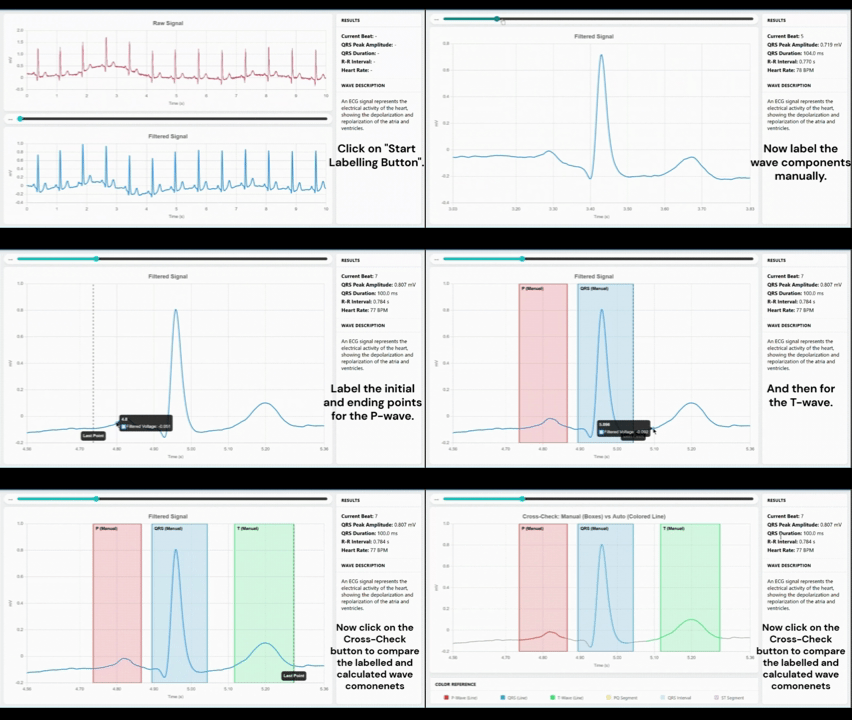
B. Manual Labelling (Interactive)
Sequence: P-Start → P-End → QRS-Start → QRS-End → T-Start → T-End
Click on . You must click on the graph 6 times in this exact order:
- P-Wave Onset (Start)
- P-Wave Offset (End)
- QRS Onset (Start)
- QRS Offset (End)
- T-Wave Onset (Start)
- T-Wave Offset (End)
Once finished, a "Cross-Check" button will appear to compare your marks against the algorithm.
4. Navigation & Details:
- Snap-to-Beat: Use the scrollbar to jump between individual heartbeats.
- Hover: Move your mouse over any colored wave component to see its medical description and duration.
5. Reset: Click on Reset button to clear all
data and start a new experiment.